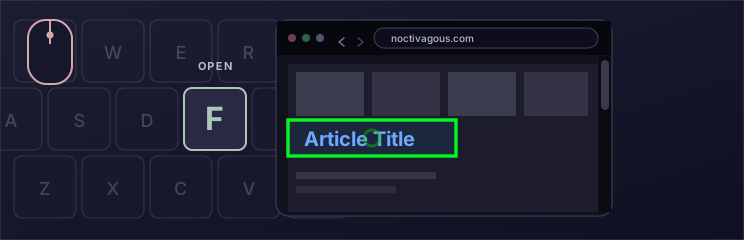
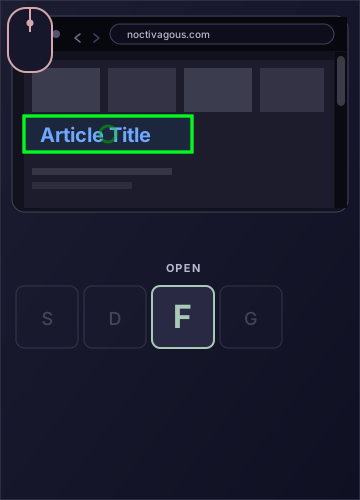
We put together a miniature demo of KeyPilot with two key actions. Hover over a link and press F to open it. Press D to go back.
This demo is for desktop, where you can use a mouse and a keyboard together.
QWERTY
ASGO BACKDOPENFGHJ
ZXCVB
harborgazette.paper
Waterfront News
The Harbor Gazette
Harbor lights return this weekendEvening walks reopen on the pierAbout the Gazette
Harbor lights return to the waterfront this weekend
Crews finished the last lamps along Pier 4, ending a two-year restoration.
Evening walks reopen after dusk. Market stalls stay open an hour later.
Read: Evening walks reopen on the pier
Evening walks reopen on the pier
The promenade is open after sunset again, with extra lighting on Pier 4.
Local shops expect a busy autumn weekend on the waterfront.
About the Gazette
The Harbor Gazette has covered the Mid-Coast and Penobscot Bay since 1884.
This miniature newspaper is here so you can try KeyPilot’s F and D keys.
THE KEYBOARD
Keyboard reference
KeyPilot features a full layout of key actions. Below is a reproduction of the keyboard reference window that you can keep open as you use the program. Hover over a key to see what it does on the default browsing layout.
Two example keys
Here are two sample keys that exhibit the usefulness of key-clicks.
RANDOM BOOKMARK,
Random Bookmark
Most of the time, people forget about their bookmarks. Random Bookmark makes them useful again: press one key and KeyPilot opens a random saved site. You can open up multiple random bookmarks at once, too. It is a convenient way to rediscover pages.
SOCIAL MEDIA.
Open URLs: Social Media
You can define your own Open URLs key with any set of sites. We included a stock one, Social Media, that opens five major social media websites in tabs together. With one key press, an Open URLs key can open up to 30 URLs in separate tabs at once.
ON THE PAGE
KeyPilot in use
Browse the web with key-clicks.A variety of actions are available under your fingertipsBuild a keyboard layout that fits your workflow.A walkthrough appears after installation.Right-click is always available to control KeyPilot.
BIMODAL CONTROL
Bimodal Control / Dual-Input (UI Theory)
Guitar As An Introduction to Bimodal Control Of Software
Consider how the guitar exists as an instrument. The hands are assigned separate tasks.
The left hand navigates to the note and sets it up to be played.
It moves across the fretboard before pressing down on the string(s)
The right hand triggers the note's sound
It holds the guitar pick and picks the string(s) according to the timing.
The two activities are interdependent. For the note to be played it has to be set up by the left hand. The left hand relies on the right hand to play the note or it will remain silent.
The Mouse
Noctivagous explains that the mouse's control of desktop computer software should seek out the same principles. As the mouse is used today, it places too much cognitive load on the computer user by combining 1) steering (moving the cursor) and 2) triggering of functionality (clicking things) into a single device and location. It assigns all of that to one hand.
Making these roles distinct, separating them into two input locations that use both hands, provides the user greater control over software. The trackpad can, for example, continue to steer the cursor while the "clicks" occur elsewhere, controlled by the other hand for the first time. An altogether different software dynamic emerges, as shown in the demo above. For the software developer the opportunities in UI theory open up.
Importantly, just one person devised the mouse in 1968, Douglas Engelbart, and it has remained unchanged since that time. Its introduction was an upgrade to the personal computer at the time, but decades later, in many instances, it produces a tedious and tiresome way to work with a computer. Touchscreen tablets did not make it irrelevant. For one, straight-on touch of a screen object is not precise. There is much room for improvement for both style of interaction with a computer and they can benefit from bimodal control / dual-input theory.
The extension exists to promote a UI theory we call Bimodal Control. Steer the cursor with the mouse as before, but activate with keyboard keys instead of mouse buttons. Hover a link and press F to click it, or G to open it in a new background tab. This is fast. It’s called a key-click.
A number of key actions are available besides F. That’s where the power emerges in KeyPilot: a keyboard layout with lots of key-click functions, customizable in the built-in Layout Config editor. It is free and under the MIT License.
The key-click animation on this page shows the gesture: point with the mouse, press F to open, then D to go back.